Game Introduction
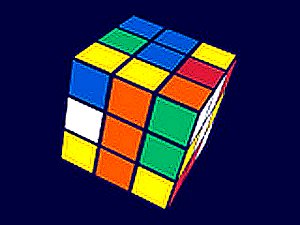
Rubik's Cube Puzzle Game brings the classic 3D combination puzzle to your screen. Invented by Ernő Rubik in 1974, the Rubik's Cube has challenged millions with its deceptively simple design. The core objective is to twist and turn the cube's layers so that each of its six faces displays a single solid color. With billions of possible combinations, every solve is a unique test of logic, memory, and patience. This online version offers a faithful digital recreation, allowing players of all ages to enjoy the timeless puzzle without needing a physical cube. It provides a perfect brain workout and a satisfying sense of accomplishment when you finally restore order from chaos.
How to Play
Players typically start by examining the scrambled cube, noting the positions of colors on each face. Using mouse or touch controls, you can rotate rows and columns of the cube. Each twist affects multiple sides, so careful planning is essential. A common beginner strategy is to focus on solving one face first, then work outward to align the edges and corners. Many solvers use the layer-by-layer method, building the cube one level at a time. The game allows unlimited moves and has no timer, so you can experiment freely. As you practice, you will develop spatial awareness and learn to anticipate how each move changes the cube's configuration.
Game Features
This online version offers smooth controls for easy rotation, making it accessible on both desktop and mobile devices. The classic puzzle is presented with clear, vibrant colors and a clean interface. There is no timer or pressure, allowing players to solve at their own pace. The game is suitable for both beginners learning the basics and experienced solvers looking to improve their speed. It helps improve memory, problem-solving skills, and spatial thinking. As a digital adaptation, it provides endless replayability with a new scramble each time.
Tips for Success
Start by learning a basic solving method, such as the layer-by-layer approach. Practice consistently to build muscle memory and recognize common patterns. Focus on understanding how each move affects multiple faces rather than memorizing long sequences. Take your time and don't rush—patience is key. If you get stuck, try breaking the problem into smaller steps, like solving one face or one layer at a time. Regular practice will gradually improve your speed and confidence. The more you play, the more intuitive the cube's mechanics become.